Dying Light - Volkan Combat Armor Bundle
¥20.65
此产品可在 United States 激活。
Add to Cart Button Icon 加入購物車

  • 平台 Steam Icon
  • 操作系统
    Windows Icon
  • 类型 Action , Role Playing
  • 开发商 Techland
  • 鼻祖 Techland S.A.
  • 发布日 2020-10-02 12:00 AM
  • 支持的语言 Czech, Dutch, English, French, German, Italian, Japanese, Korean, Polish, Russian, Spanish, Thai, Turkish, Portuguese-Brazil, Traditional Chinese, Spanish Mexico
Dying Light - Volkan Combat Armor Bundle

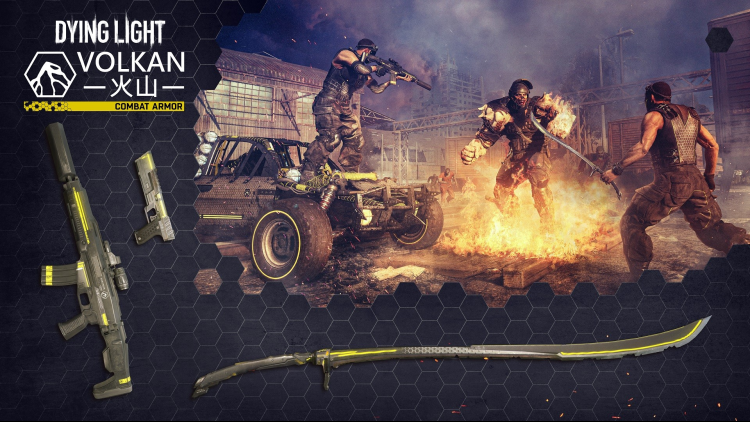
加入 Volkan 公司,为更光明的未来而战,使用专为以最高效率消灭所有形式的感染者而开发的最先进的规范操作装备。不要错过测试 Volkan 高科技武器部门的旗舰产品的机会 - 为明天的精英士兵设计的尖端 Volkan 战斗突击步枪。利用其内置消音器、大夹子和反射瞄准器,以致命的精确度无声无息地消灭众多敌人。出色的沃尔坎战斗手枪也使用了同样的创新弹药储存技术。除了加长弹匣外,这款终极侧臂还将以其高射速和连发模式给您留下深刻印象。如果不能使用枪支,Volkan Combat Sword——由高级复合材料制成并配备了伤害提升系统——将在近距离为您提供无价的优势。装上你的武器,穿上你的新 Volkan Combat Armor 驾驶 Volkan Combat Buggy,今天就开始建设一个更安全的明天。

购买 Dying Light - Volkan Combat Armor Bundle PC Steam Game Code - 最优惠价格 | eTail

您可以通过官方零售商 Dying Light - Volkan Combat Armor Bundle 以最优惠的价格快速购买 cn.etail.market PC 游戏

DYING LIGHT & DYING LIGHT: THE FOLLOWING © Techland 2020. Published by Techland. All other trademarks and copyrights are the property of their respective owners.

Dying Light - Volkan Combat Armor Bundle 最低系统要求:
OS: Windows® 7 64-bit / Windows® 8 64-bit / Windows® 8.1 64-bit
Processor: Intel® Core™ i5-2500 @3.3 GHz / AMD FX-8320 @3.5 GHz
Memory: 4 GB RAM DDR3
Hard Drive: 40 GB free space
Graphics: NVIDIA® GeForce® GTX 560 / AMD Radeon™ HD 6870 (1GB VRAM)
DirectX®: Version 11
Sound: DirectX® compatible
Additional Notes: Laptop versions of graphics cards may work but are NOT officially supported.

Windows-compatible keyboard, mouse, optional controller (Xbox 360 Controller for Windows recommended)

Dying Light - Volkan Combat Armor Bundle 推荐的系统要求 :
OS: Windows® 7 64-bit / Windows® 8 64-bit / Windows® 8.1 64-bit
Processor: Intel® Core™ i5-4670K @3.4 GHz / AMD FX-8350 @4.0 GHz
Memory: 8 GB RAM DDR3
Hard Drive: 40 GB free space
Graphics: NVIDIA® GeForce® GTX 780 / AMD Radeon™ R9 290 (2GB VRAM)
DirectX®: Version 11
Sound: DirectX® compatible
Additional Notes: Laptop versions of graphics cards may work but are NOT officially supported.

Windows-compatible keyboard, mouse, optional controller (Xbox 360 Controller for Windows recommended)

在 Steam 上激活

从此处下载并在您的计算机上安装 Steam 客户端.

https://store.steampowered.com/?l=schinese

2)打开Steam客户端,注册并登录。 然后,找到顶部菜单上的“游戏”选项卡。 单击它并选择“在 Steam 上激活产品……”

 

3)输入显示在 eTail 订单页面上的代码。 市场并按照显示的步骤激活您的游戏。


4)现在可以监控游戏,您可以在 Steam 的“库”部分看到它。 您现在可以下载并安装游戏。

5)如果您需要更多信息和支持,可以单击此处:https://help.steampowered.com/en/wizard/HelpWithSteam

推荐的