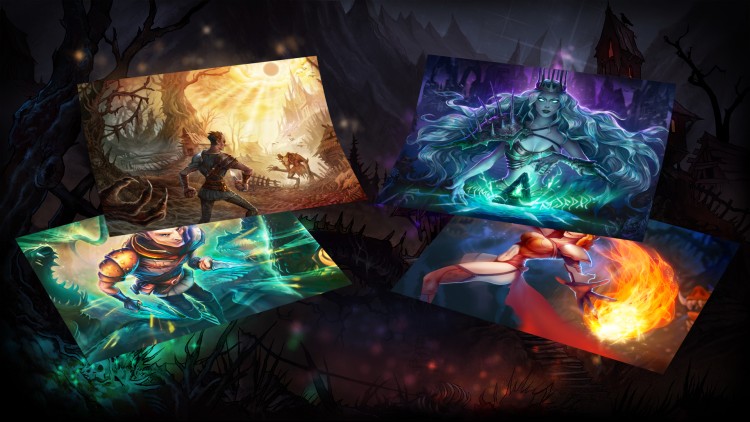
Deck of Ashes - Print-Ready Posters
¥20.39 ¥10.19 50%
不要错过折扣机会!
  • 小时
  • 分钟
  • 此产品可在 United States 激活。
    Add to Cart Button Icon 加入購物車

    • 平台 Steam Icon
    • 操作系统
      Windows Icon
    • 类型 Adventure , Indie , RPG
    • 开发商 AYGames
    • 鼻祖 ESDigital Games
    • 发布日 2019-04-19 12:00 AM
    • 支持的语言 English, French, German, Japanese, Russian, Simplified Chinese
    Deck of Ashes - Print-Ready Posters

    由 AYGames 为 Deck of Ashes 创作的精美绝伦的艺术作品集。

    该捆绑包包括:
    1) 可打印的 A2 数字海报
    2)高清品质桌面壁纸

    学分:
    艺术方向:
    叶卡捷琳娜·贝霍娃
    2D 艺术家:
    伊琳娜·埃夫雷莫娃
    米哈伊尔·洛加乔夫
    尤利娅·诺沃塞尔采娃

    购买 Deck of Ashes - Print-Ready Posters PC Steam Game Code - 最优惠价格 | eTail

    您可以通过官方零售商 Deck of Ashes - Print-Ready Posters 以最优惠的价格快速购买 cn.etail.market PC 游戏

    ESDigital Games Ltd ©2020 All rights reserved. Developed by AYGames. Published by ESDigital Games Ltd. Deck of Ashes® is a Registered Trademark.

    Deck of Ashes - Print-Ready Posters 最低系统要求:
    Windows

    OS: Windows 7, 8, 10
    Processor: 2.0 Ghz
    Memory: 2 GB RAM
    Graphics: 512 Mb capable of OpenGL 2.0+ support
    Storage: 1 GB available space

    macOS

    OS: MacOSX 10.10 or higher
    Processor: Intel Core i5 – 2.4 GHz
    Memory: 512 MB RAM
    Graphics: AMD Radeon HD 6490M 256 МБ
    Storage: 1 GB available space

    Deck of Ashes - Print-Ready Posters 推荐的系统要求 :
    Windows

    OS: Windows 7/8/10
    Processor: Intel Core i5 – 2.4 GHz
    Memory: 512 MB RAM
    Graphics: GeForce GT 730 (1Gb) / Radeon R7 A10-7700K
    Storage: 1000 MB available space
    Sound Card: Version 11

    macOS

    OS: MacOSX 10.10 or higher
    Processor: Intel Core i5-2400S, 2.6 GHz
    Memory: 512 MB RAM
    Graphics: AMD Radeon HD 6750M (512 Мб)
    Storage: 1000 MB available space

    在 Steam 上激活

    从此处下载并在您的计算机上安装 Steam 客户端.

    https://store.steampowered.com/?l=schinese

    2)打开Steam客户端,注册并登录。 然后,找到顶部菜单上的“游戏”选项卡。 单击它并选择“在 Steam 上激活产品……”

     

    3)输入显示在 eTail 订单页面上的代码。 市场并按照显示的步骤激活您的游戏。


    4)现在可以监控游戏,您可以在 Steam 的“库”部分看到它。 您现在可以下载并安装游戏。

    5)如果您需要更多信息和支持,可以单击此处:https://help.steampowered.com/en/wizard/HelpWithSteam

    推荐的